
1. Download the app (LINK): The Studo app is available on Apple Appstore, Google Play Store, Amazon Appstore, and Huawei App Gallery. You can access the app via the link or by typing “Studo” in your mobile device’s app store.
2. Studo user account: When you first open the app, the screen will display “I am new to Studo”. To sign up, click the button, accept the terms of use, and create your Studo profile linked to your personal phone number. For security, after entering your details, you will receive a confirmation code via SMS to activate your account.
3. Choose the country, location of study, and your university.
4. Sign in: Sign in to the Studo app using your Alma Mater identity (SSO).
5. Action! Sign-in is successfully completed and you can start using your Studo profile to easily organize your studies and student life.
STUDO support:
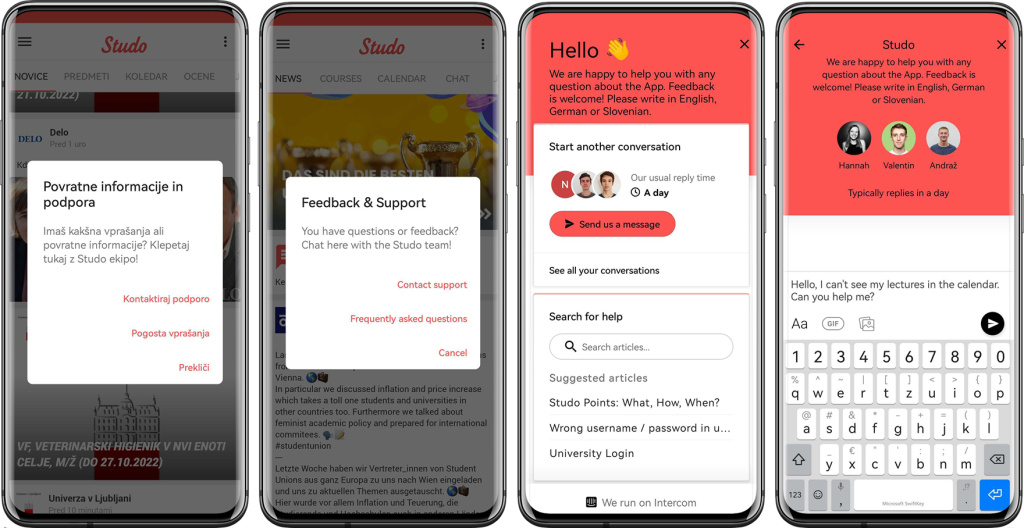
From left to right:
(1) In the upper right corner of the Studo app you can contact support.
(2) In the “Search for help” field you can find answers to frequently asked questions about using the Studo app.
From here you can also access support.
(3) In this window you can contact us at any time regarding questions about the Studo app.