
Preparing the file
Before uploading, check whether Turnitin can accept your file. For assignments where similarity is checked, the supported formats include the following:
- Word (.doc, .docx), PDF, RTF, TXT and ODT,
- PowerPoint (.pptx),
- Google Docs through the Google Drive service.
| What to check | Recommendation |
|---|---|
| File size | As a rule, less than 100 MB. |
| Length | At least 20 words and no more than 800 pages for a Similarity Report to be produced. |
| The text must be selectable. A scanned PDF that contains only images of the pages may be rejected. | |
| Protection | Do not submit password-protected files. |
| Number of files | One document is submitted to a standard assignment. You cannot upload several documents or a ZIP archive in a single submission. |
Rule: if the course instructor requires a specific format, for example PDF or DOCX, follow their instructions even when Turnitin technically supports other file types as well.
Submitting the assignment
In the new standard assignment, submission is usually available in the Your work section. You can upload the file from your computer or from supported cloud storage.
Open the Turnitin assignment.
Click Submit or the option for uploading a file.
Choose the upload method. Drag and drop the file, select it on your device, or use Google Drive or Microsoft OneDrive if the option is available.
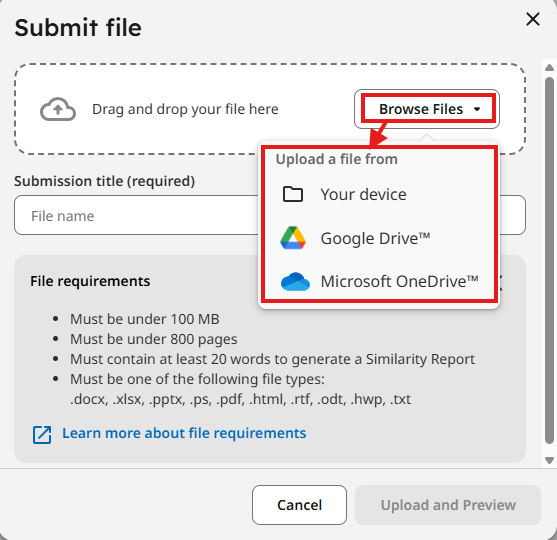
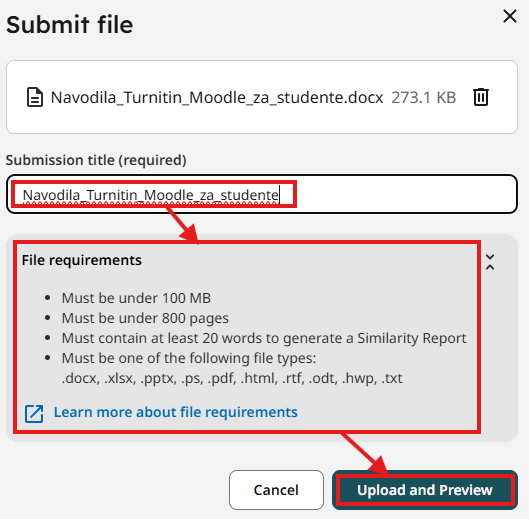
Select the file. The submission title may be filled in automatically from the file name; edit it if needed.
Click Upload and Preview.
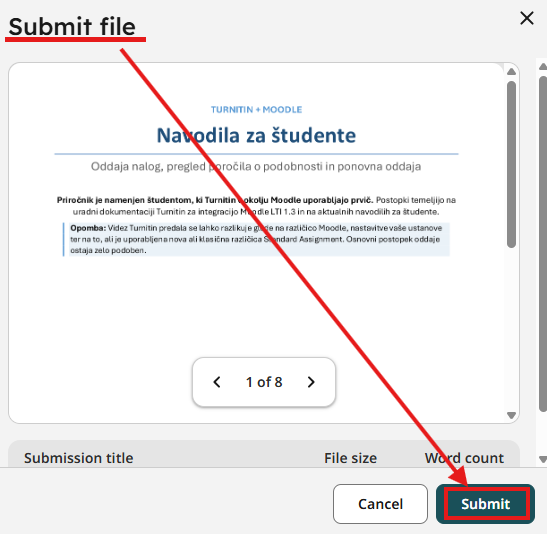
Review the preview carefully. Check that the correct and final version of the file has been uploaded and that the content is displayed correctly.
Click Submit and wait for the confirmation that the submission was successful.
Caution: do not close the browser while the file is uploading and while you are confirming the submission.